Fin Monitor Pricing: Should You Pay Extra for QA?
Fin's Monitor feature is locked behind a $99/month Pro add-on. Here's what you're actually paying for, and why quality monitoring shouldn't be a premium upsell.
Fin's AI agent resolves customer conversations at $0.99 per outcome. Simple enough. But when you want to actually monitor the quality of those resolutions - track scores, spot trends, catch problems before they snowball - that's a separate product. And it costs extra.
Fin Monitors live inside the "Pro" add-on, priced at $99/month for analysis of 1,000 conversations. That's on top of your per-resolution fees. On top of your helpdesk seat costs. On top of everything else.
The pitch is that you're paying for "advanced analysis." The reality is that you're paying for something that should be table stakes: knowing whether your AI is doing a good job.
Jump to a section:
- What is Fin Monitor?
- What does the Pro add-on include?
- The real cost breakdown
- Why monitoring shouldn't be an add-on
- What users are saying
- A better approach
What is Fin Monitor?
Fin Monitor is a quality assurance tool that tracks how well Fin's AI agent handles customer conversations. It lets you set up automated checks on conversation quality, flag issues, and get alerts when things go wrong.
Think of it as a QA layer for your AI support. It watches conversations, scores them, identifies patterns, and tells you when the AI is making mistakes or when a particular topic is trending in a bad direction.
This is useful. In fact, it's essential. If you're letting an AI handle customer conversations autonomously, you need a way to verify it's actually doing a good job. Otherwise you're flying blind - resolving tickets without knowing if the resolutions are any good.
The problem isn't what Fin Monitor does. It's that you have to pay extra for it.
What does the Pro add-on include?
The Pro add-on bundles several analysis features together at $99/month for 1,000 conversations:
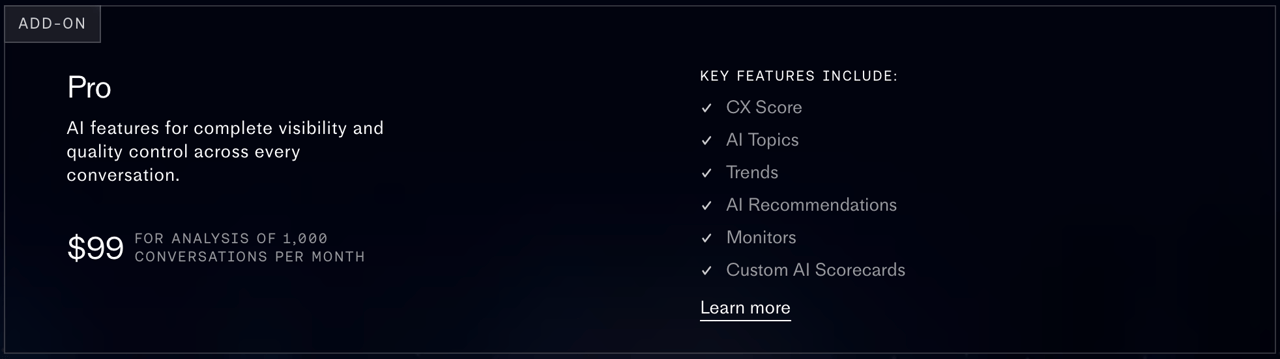
| Feature | What it does |
|---|---|
| CX Score | Automated quality scoring for conversations |
| AI Topics | Automatic categorization of conversation subjects |
| Trends | Pattern detection across conversation volume and topics |
| AI Recommendations | Suggestions for improving AI performance |
| Monitors | Automated QA checks with alerts |
| Custom AI Scorecards | Build your own evaluation criteria |
These features are only available as a bundle. You can't buy just Monitors. You can't add just CX Score. It's $99/month for the package, or nothing.
And the 1,000-conversation limit matters. If your AI handles 3,000 conversations a month, you're paying for analysis on only a third of them - or paying for additional capacity. The pricing page doesn't make it clear what happens when you exceed 1,000 conversations, which usually means you're talking to sales.
What does Fin actually cost with Monitors?
Let's do the math for three common scenarios.
Small team - 500 AI resolutions/month
| Cost item | Monthly |
|---|---|
| Fin resolutions (500 x $0.99) | $495 |
| Helpdesk seats (3 agents x $29) | $87 |
| Pro add-on (Monitors) | $99 |
| Total | $681/month |
The Pro add-on adds 15% to your total cost. For a small team, that's significant. And you're paying $99 to monitor just 500 conversations - well under the 1,000 cap, meaning you're paying for unused capacity.
Mid-size team - 2,000 AI resolutions/month
| Cost item | Monthly |
|---|---|
| Fin resolutions (2,000 x $0.99) | $1,980 |
| Helpdesk seats (8 agents x $29) | $232 |
| Pro add-on (Monitors) | $99+ |
| Total | $2,311+/month |
At 2,000 conversations, you've exceeded the 1,000-conversation Pro limit. You'll likely need to negotiate additional capacity - and the cost of that isn't published. Your annual spend is approaching $28,000 before you know the full monitoring cost.
Large team - 5,000 AI resolutions/month
| Cost item | Monthly |
|---|---|
| Fin resolutions (5,000 x $0.99) | $4,950 |
| Helpdesk seats (15 agents x $29) | $435 |
| Pro add-on (Monitors) | $99+ |
| Total | $5,484+/month |
At this scale, you're paying $60,000+ annually for AI resolutions alone. The $99 Pro add-on looks small in comparison, which is exactly the point. Intercom knows that at scale, $99 feels like a rounding error. But the principle remains: you're paying extra to verify that the $60,000 you're spending on AI resolutions is actually delivering quality outcomes.
Why monitoring shouldn't be an add-on
Here's the fundamental problem with charging separately for quality monitoring: it creates a perverse incentive.
Fin charges per resolution. The more conversations it resolves, the more Intercom earns. Monitoring those resolutions - making sure they're actually good - costs you extra. So the default state, if you don't pay for Pro, is that Fin resolves as many conversations as possible with no automated quality checks.
That's like a restaurant charging you for the meal and then charging extra for the health inspection.
You're already paying for the outcomes
At $0.99 per resolution, you're paying for successful outcomes. The word "outcome" implies quality - Fin resolved the issue, the customer is satisfied, the conversation is closed properly. If that's what you're paying for, why do you need a separate product to verify it?
Quality monitoring should be part of the resolution cost. When you pay for a resolved conversation, knowing whether it was actually resolved well should be included.
The data asymmetry problem
Without Monitors, Fin tells you how many conversations it resolved. With Monitors, you find out how many it resolved well. That's a critical distinction, and gating it behind a paywall means most teams are operating on incomplete data.
You're making staffing decisions, knowledge base updates, and product roadmap choices based on resolution counts. But resolution count without quality context is a vanity metric. A conversation can be "resolved" while the customer leaves frustrated. And when support is a strategic function, not a cost center, you need that quality data to make the case for investment.
Scale makes it worse
The 1,000-conversation limit on the Pro add-on means that as your volume grows, you're either paying more for monitoring or monitoring a smaller percentage of your conversations. Neither option is good.
A team handling 5,000 conversations a month that only monitors 1,000 is sampling 20% of their interactions. That's not quality assurance - it's a spot check. And spot checks miss the edge cases that cause the most damage.
What are users saying about Fin pricing?
The $0.99 per resolution model gets mixed reviews. Teams that handle high volumes appreciate the outcome-based pricing - you only pay when Fin actually resolves something. But the add-on costs and total spend catch people off guard.
The add-on creep
Fin's core product is the AI agent. But to get meaningful value, you often need:
- Pro ($99/month) for quality monitoring and analysis
- Copilot ($35/month per user) for agent assistance
- Helpdesk seats ($29/month per agent) if you're using Intercom's platform
What looks like simple per-resolution pricing turns into a multi-layered cost structure. Each layer is individually reasonable. Together, they add up fast. It's the same pattern we documented in our LiveAgent pricing breakdown - individually defensible line items that compound into something much larger than the headline number.
The 50-outcome minimum
Fin requires a minimum of 50 outcomes per month. At $0.99 each, that's a $49.50 floor. For teams just getting started with AI support, you're paying for resolutions whether they happen or not.
No transparency on overage pricing
What happens when you exceed 1,000 conversations on the Pro add-on? The pricing page doesn't say. "Talk to sales" pricing is the opposite of transparent, and it makes budgeting nearly impossible for growing teams.
Is there a better alternative to Fin Monitor?
We built SupportWire with a different philosophy: quality monitoring isn't a premium feature. It's a core responsibility.
Monitoring included on every plan
Every SupportWire plan includes conversation monitoring, quality scoring, trend detection, and automated alerts. No add-on. No per-conversation analysis cap. No separate product to buy.
When your AI resolves a conversation, SupportWire automatically evaluates the quality of that resolution. You see the score, the reasoning, and any flags - all in the same dashboard where you manage your support. This is a core product principle for us.
Half the per-resolution rate
SupportWire bills AI resolutions at $0.49 each, exactly half of Fin's $0.99. You only pay when Kal closes the ticket; nothing for handoffs, nothing for drafting, nothing for Copilot. Monitoring, analytics, and all channels are baked into the per-seat plan.
That removes the tension between resolution volume and quality oversight. Fin gets pricier the more it resolves; Kal stays half the price, every time.
Full visibility, not sampled visibility
We don't cap how many conversations get analyzed. Every conversation that your AI handles gets scored and tracked. Not a sample. Not 1,000 out of 5,000. All of them.
For teams that take quality seriously, this is the difference between knowing your AI is working and hoping it is.
The cost comparison
For a mid-size team handling 2,000 AI resolutions a month:
| Fin + Intercom | SupportWire (Growth) | |
|---|---|---|
| AI resolutions (2,000/mo) | $1,980 ($0.99 each) | $980 ($0.49 each) |
| Helpdesk seats (8 agents) | $232 | $79 base + 3 extra × $19 = $136 |
| Quality monitoring | $99+ (Pro add-on) | Included |
| Agent copilot | $280 (8 x $35) | Included |
| Monthly total | $2,591+ | $1,116 |
Kal's per-resolution rate is half of Fin's. Drafting and Copilot stay free. The gap widens as volume grows.
Calculate what you'd save with our support cost calculator, or see how your current response quality stacks up with the response quality grader.
The bottom line
Fin Monitor is a good product solving a real problem. Quality assurance for AI support is essential, and the features in the Pro add-on - CX Score, Topics, Trends, Monitors, Scorecards - are genuinely useful.
But charging $99/month extra for it, with a 1,000-conversation cap, on top of per-resolution fees, on top of helpdesk seats, on top of copilot costs? That's not a pricing model designed for your benefit. It's a pricing model designed to maximize revenue per customer while keeping each individual line item small enough that it's hard to object to.
Quality monitoring for AI support should be included. Full stop. You shouldn't have to pay extra to know whether the AI you're already paying for is doing its job well.
If you want AI-powered support with quality monitoring built in from day one - no add-ons, $0.49 per resolution (half of Fin), no conversation caps - try SupportWire. Free trial, no credit card required. Not sure which tool is right for your team? Take the Support Tool Finder quiz for a personalized recommendation.
See how other tools compare: full comparison page | Intercom vs SupportWire | Zendesk vs SupportWire | HelpScout vs SupportWire | LiveChat vs SupportWire
Free tools: Support Cost Calculator | NPS Calculator | Live Chat ROI Calculator | Response Quality Grader | AI Canned Response Writer